

Most meetings don’t fail because of poor discussions.
They fail because nothing happens afterward.
A team agrees on deadlines, discusses priorities, assigns responsibilities, and decides next steps — but once the meeting ends, those action items often disappear into:
- Scattered notes
- Slack messages
- Recordings
- Follow-up emails
- Someone’s memory
This is one of the biggest productivity problems modern teams face.
Traditional meeting notes were designed for documentation, not execution.
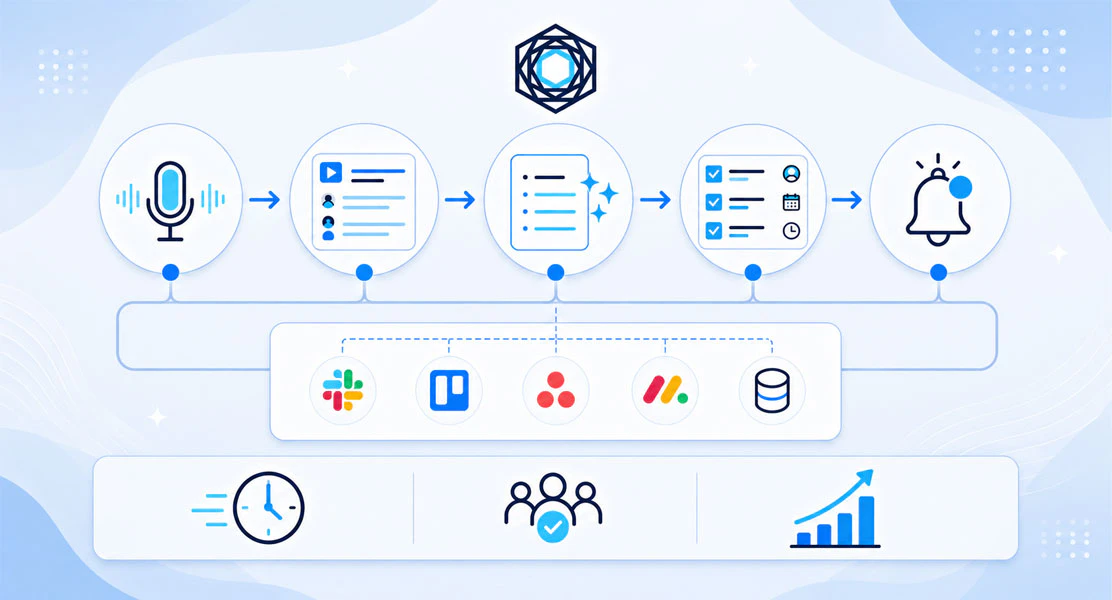
Today, high-performing teams are moving toward AI-powered meeting workflows that automatically convert conversations into actionable tasks, assign ownership, and sync work into tools like Asana, Jira, Trello, and Slack. Platforms like Gennie are helping teams automate meeting follow-ups and reduce the gap between discussion and execution.
In this guide, we’ll explain:
- Why do meeting action items get lost
- Why traditional note-taking systems fail
- How Automated Workflows Improve Accountability
- and How teams turn meetings into execution-ready tasks automatically
Why Meeting Notes Usually Fail
Most meeting systems stop at summarization.
Teams write notes, create documents, or record conversations, but very little of that information turns into structured execution.
This creates several common problems:
- Unclear ownership
- Forgotten action items
- Repeated discussions
- Delayed follow-ups
- Duplicated work
- Task tracking confusion
The issue becomes even bigger for:
- Remote teams
- Startups
- Product teams
- Agencies
- Engineering organizations
As companies move faster, manual follow-up systems break down quickly.
The Real Problem Isn’t Meetings - It’s Execution
Most teams already spend enough time discussing work.
The real operational challenge begins after the conversation ends.
For example:
- A product manager discusses feature priorities
- A client requests changes during a call
- An engineering lead identifies blockers
- A founder assigns tasks during a weekly sync
But unless those decisions become structured tasks immediately, teams lose momentum.
This creates a cycle where:
- Meetings repeat unnecessarily
- Accountability becomes unclear
- Progress slows down
- Teams rely on constant reminders
Over time, meetings become documentation systems instead of execution systems.
What Modern Teams Do Differently
Modern teams no longer treat meeting notes as the final output.
Instead, they focus on:
- Action item extraction
- Ownership assignment
- Workflow automation
- Task synchronization
- Operational visibility
The goal is simple:
Reduce the gap between discussion and execution.
Today, teams increasingly use AI-powered systems that can:
- Identify action items automatically
- Detect responsibilities
- Organize decisions
- Create structured tasks
- Push work into project management tools
This allows meetings to become execution workflows instead of static records.
How to Automatically Turn Meeting Notes Into Tasks
1. Capture Conversations Clearly
The first step is collecting meeting discussions in a structured format.
This can include:
- Zoom meetings
- Google Meet calls
- Offline discussions
- Sprint planning sessions
- Client meetings
- Async voice recordings
Instead of relying entirely on manual notes, many teams now use AI-powered meeting systems to automatically transcribe conversations.
2. Extract Action Items Automatically
Not every sentence in a meeting matters equally.
The important information usually includes:
- Deadlines
- Decisions
- Responsibilities
- Blockers
- Next steps
- Deliverables
AI meeting workflows can identify these patterns automatically and organize them into structured outputs.
For example:
- “Sarah will finalize the proposal tomorrow.”
- “Engineering needs to fix the onboarding bug.”
- “Marketing should schedule the launch campaign.”
These become actionable tasks instead of buried meeting notes.
3. Assign Ownership Clearly
One major reason teams lose momentum after meetings is a lack of clear accountability.
Modern workflows solve this by attaching:
- Owners
- Deadlines
- Priorities
- Project context
directly to action items.
This helps teams avoid confusion later and improves operational visibility immediately after meetings end.
4. Push Tasks Into Existing Workflows
Execution works best when tasks appear within the areas where teams already manage work. Many teams now use AI-powered systems to automatically convert meeting notes into Asana tasks, rather than manually copying action items after every discussion.
That’s why workflow integrations matter.
Modern meeting execution systems connect directly with tools like:
- Asana
- Jira
- Trello
- Slack
- Todoist
- Notion
This eliminates the need for manual task copying and reduces operational friction.
Why AI Meeting Workflows Matter More for Remote Teams
Remote and distributed teams often struggle with fragmented information.
Important decisions live across:
- Recordings
- Chat apps
- Documents
- Task managers
- Meeting summaries
Without a centralized execution workflow, follow-ups become difficult to track.
AI-powered meeting systems help remote teams by:
- Organizing decisions automatically
- Improving accountability
- Reducing admin work
- Increasing visibility
- Streamlining follow-ups
This is one reason why meeting-to-task automation is becoming increasingly important for modern teams.
Notes Alone Are No Longer Enough
For years, productivity tools focused heavily on note-taking. But documentation alone does not create progress. Execution does.
A meeting summary explains what happened. An execution workflow ensures something happens next. This is why many teams are now looking beyond AI meeting summaries and seeking systems that drive actual execution after conversations end.
That difference matters.
The future of meeting productivity is not just transcription or summarization. It’s turning conversations into operational workflows.
How Gennie Helps Teams Turn Meetings Into Execution
Unlike traditional meeting tools that focus mainly on summaries, Gennie helps teams transform conversations into execution-ready workflows.
Gennie helps teams:
- Capture discussions
- Extract action items
- Identify ownership
- Organize follow-ups
- Sync tasks across tools
- Reduce manual coordination
The platform is designed around one core idea: meetings should lead to execution, not confusion.
Teams can use Gennie alongside tools like:
- Asana
- Jira
- Trello
- Slack
to streamline post-meeting execution workflows.
Final Thoughts
Meetings don’t create results.
Execution does.
The fastest-moving teams today are not necessarily the teams having more discussions — they’re the teams with better systems for turning conversations into action.
As work becomes increasingly distributed and fast-paced, the ability to automatically convert meeting discussions into structured execution workflows will become essential for modern organizations.
Because ultimately, the value of a meeting is not what was discussed.
It’s what happens afterward.
FAQ's
Q1. Can AI automatically create tasks from meetings?
Yes. Modern AI meeting systems can identify action items, deadlines, and ownership from conversations and automatically organize them into structured tasks.
Q2. Why do meeting action items get forgotten?
Action items are often buried in notes, recordings, chat messages, or disconnected tools, lacking proper ownership or workflow integration.
Q3. What tools help manage meeting follow-ups?
Teams commonly use project management platforms like Asana, Jira, Trello, Slack, Todoist, and Notion to manage meeting-related tasks and follow-ups.
Q4. How do remote teams improve meeting accountability?
Remote teams increasingly rely on AI-powered meeting workflows that organize decisions, assign ownership, and automatically streamline execution.
Q5. Are meeting summaries enough for productivity?
Not always. Summaries provide context, but execution workflows ensure tasks are assigned, tracked, and completed afterward.